Logon again to a UNIX computer.
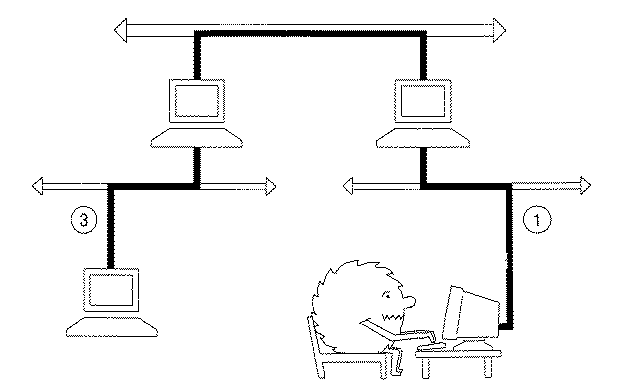
To send packets from your computer on your local LAN (network 1) to computers which belong to other IP networks that are not directly connected to your LAN (e.g. a computer located on network 3 in the figure above) requires the use of an intermediate system (i.e. an IP router). Each network normally has a local (default) router which will be connected to the local LAN and also to another (remote) LAN.
The remote LAN will in turn be connected via other routers to more distant LANs. The use of many routers connected in series, one after another, allows you to send packets to any other IP network in the Internet.
This exercise examines how IP sends packets to a remote network using the local router. It will use two routers during the exercise the right router in the figure (the default router for the computer's LAN) and the left router in the figure (the router which connects the MC campus network (mcnet) to the Internet WAN).
Examine the computers attached to your local IP network using arp
Type:
/sbin/arp -a
If the IP addresses are shown as names (e.g. fred.abdn.ac.uk), rather than numeric IP addresses (in dotted decimal notation) you should use the Domain Name Service (DNS) to find (resolve) the numeric address of a few of the names. The dns service may be accessed via a client program called nslookup by typing:/sbin/nslookup name
Do you notice something in common about the network part of all the listed IP addresses?
All the IP addresses which were listed, should have the same IP network number as your own computer. This is how IP knows that the packets are to be sent directly to a computer connected to the LAN. It is also the way IP determines that a packet is not destined for the local LAN, and requires a router to forward the packet to another LAN.Using the local router
To proceed further we will need to use two routers. The first router is the default router for your computer's IP network. This is the router to which all non-local IP packets will be sent - and the path by which your computer communicates with all computers which are not directly connected to your local LAN.Verify that your computer is connected to the campus network.We will also use the main site router at MC (sometimes books refer to this confusingly as the "gateway" router). This router connects the campus networks at Mississippi College to networks which are remote from MC (e.g. connected to a remote part of the Internet) using a WAN formed from serial communications links leased from national telecommunication providers (e.g. AT&T and WorldCom/UUnet).
In this exercise, we will send packets directly to the ICMP echo server running on the main site router. In exercise 4 we will use the router to contact computers located on some remote IP networks.
The router which connects the MC campus network to the national WAN is currently located in the Noc room in Self Hall and has an IP address of "192.239.217.65". Try to contact the ICMP server at this computer.Type:
/usr/sbin/ping 192.239.217.65
Did you get a reply? You should have, this verifies that the site router is operating. We may now proceed. Now use the arp program to examine the contents of the arp cache for your own computer:Type:
/sbin/arp -a
One of the computers listed in the arp cache must be the local IP router (also known as the "default" router). But how does your computer know which IP address corresponds to the default router for your LAN?netstat -rnThe answer is the person who set-up your computer has already configured this. You can find the address of the default router by typing (the options "r" indicates that the "routing table" should be printed and the option "n" indicates ip addresses should be printed in numeric (dotted decimal notation)):
This lists the routing table in your computer. (Other information such as the MTU size of each interface may also be shown). Among other addresses there should be an entry here for the loop back interface which was used in exercise 1. There should also be one marked as "default".Which router is specified as the local (default) router?
Use ping (see exercise 1) to verify that the local router is working. (Some computers are connected to a LAN which has a direct connection to the main site router - in this case, the default router may be the site router!)How does your computer know when to route the packet to the local router and when to use arp to find the hardware address of a computer connected to the local network?
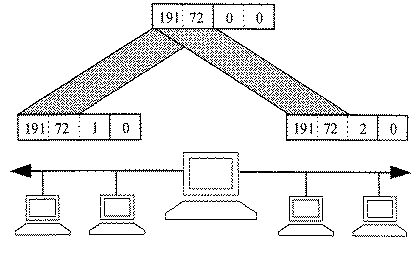
(Hint: look at the figure above which shows two IP networks (192.72.1.0) and (192.71.2.0) connected via an IP router. In this case the two networks are subnets of the 192.72.0.0 network and the subnet netmask is 0xffffff00. Each time a packet is sent, the sending computer must decide whether to the destination is directly reachable using the local LAN or whether the packet should be sent to the local router.)Exercise 4 will now use this router to contact some computers connected to remote parts of the Internet.