The MRP server listens for connections on TCP port 45301.
Users and Privilege
An MRP server has a list of users. Each user has a name constructed of printable, non-blank ASCII characters. Each client connection to the server is either unprivileged, or has the privileges of a single user u. Connections are initially unprivileged, but may acquire privileges using the IAM request (see below). Most operations are allowed only to privileged client connections. Of course, the privileges are removed when the connection is closed for any reason.Message Queues
Each user supported by an MRP server has a message queue. Clients add and remove messages from these queues. Any client with a privileged connection may add a message to the message queue for any valid user. A client whose connection has privileges of user u may remove the message from the head of u's queue. When a message is retrieved from the server, it is deleted from its queue; each message is retrieved exactly once. If multiple clients attempt to remove a message from the same queue at the same time, the server will serve them serially in whatever order it likes best.Messages are plain text. The server is allowed to limit the sizes of individual messages or message queues. If limits are applied, they should be fairly large.
Communications Formats
Three types of transmission pass between the client and the server.- The client sends requests to the server.
- The server sends responses to the client.
- A message body may be sent either way.
A message body consists of any number of lines of text, each line terminated by carriage return and newline (\r\n). A message is terminated by a line consisting of a single period (also with \r\n.) No message may contain such a line.
Requests and responses each consist of single lines of text, terminated with a carriage return and newline (\r\n). A request begins with a three-letter command, and may contain additional parameters, separated by spaces. The command must be the first three letters of the line; no leading spaces are allowed. Responses begins with the letter S or E for success or error. That is followed by one space, then a numerical code indicating the type of error, or what the client should do next. Code numbers start from 100, and are listed below. The code number is followed by a space, then some short descriptive text message.
Requests
These are the legal request command strings:Success Responses
These are legal success response codes. As noted above, success responses are a single line consisting of the letter S, one or more spaces, a code, one or more spaces, then any text. Each is sent in response to the client's request or action.| Code | Sent After | Description |
|---|---|---|
| 100 | Connection | This is sent to a new client when it connects. It is a response to the establishment of a connection, not to a request. The text part may be used to describe the server software. |
| 101 | QRY | The text part is a non-negative number which is the size of the message queue. |
| 102 | GET | The client should expect the message body to follow. |
| 103 | SND | The client should now send the message body. |
| 104 | Message body | This is sent after the server receives a the message body, to indicate that the message was successfully added to the queue. |
| 105 | IAM | This indicates that the credentials were accepted. |
| 106 | CHP | This indicates that the password was changed as requested. |
| 107 | BYE | The server is about to close the connection. |
Error Responses
The following codes are defined for error responses. One of these codes follows the letter the E on the error response.| Code | Sent After | Description |
|---|---|---|
| 100 | Bad Requests | This response is sent to anything that the server doesn't understand. |
| 101 | QRY, GET, SND or CHP | This is sent in response to a request which requires user privileges, when the connection has none. |
| 102 | IAM | The user/password combination is invalid. |
| 103 | GET | There was no message in the queue. |
| 104 | SND | Attempt to send to a non-existent user. |
| 105 | Termination | The server sends this when the socket closes unexpectedly. The client is very unlikely to ever see it. |
| 106 | Message body | The server is allowed to limit the size of messages it stores. If you send one which is too large, the server will simply drop the last part of it, then respond with a 106 error. The first part of the message will be added to the queue. Note that the server will continue to read lines of your message until you give the . line; it just discards the data past the size limit. |
| 120 | Anything | This indicates an internal server error. The text part of the message may specify the cause more precisely. These errors are not caused by the client, and most often occur when the server exhausts resources such as disk or memory. |
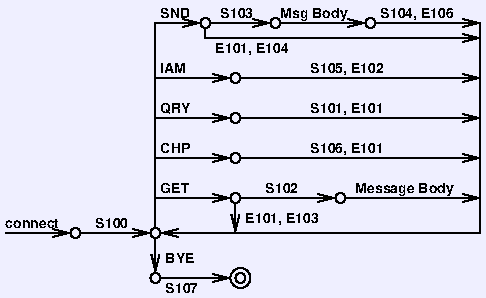
State Diagram
The state diagram to the right shows order in which messages must be transmitted. Note that it does not show the 100 or 120 error. The 120 may occur at any time, and the 100 won't occur unless the client sends junk.Example
Here is an example of a message fetch. It shows the actions of the client and the server:
Here's a message send: