- Finding The Receiver
- Internet messages are sent to an IP address, which is virtual.
- But they are encapsulated in a hardware packet.
Hardware doesn't know anything about IP addresses, it delivers to
a hardware address.
IP dst = 20.30.40.50IP PayloadFrame dst = ?Frame Payload (IP datagram)
- The host that sends this packet must fill in the hardware address that will get the packet to 20.30.40.50.
- So there must be some way to map an IP address to the hardware address.
- This is called Address Resolution, for which we have an Address Resolution Protocol (ARP).
- This may be done is several ways. Here is the standard ARP used to
support IP4.
- To look up 20.30.40.50, the sender first sends a broadcast message “who has 20.30.40.50”
- If some host does, it responds. The response is sent directly to the requestor'sMAC address; no need to broadcast.
- If the sender may repeat the request if there's not answer, but if no answer is received in a reasonable time, it fails the send.
- Caching
- The sender will cache the result for some time, since it is likely more messages will be sent.
- The “who has” message includes the IP address of the requestor, so the host that answers knows the IP ↔ MAC mapping for the sender, which it also caches.
- A exchange can proceed between the two for a while without having to compute the mapping again for a while.
- ARP messages are not IP messages; they are encapsulated directly into
the hardware packet.
ARP MessageFrame HeaderFrame Payload (ARP Message)
- The Ethernet MAC header records frame type hex 0806, which is ARP, not IP.
- ARP message format
Hardware address typeProtocol address typeHdwr Addr LenPcol Addr LenOperationSender Hardware Address (first 4 bytes)Snd Hdwr Addr (last 2 bytes)Snd Ptcl Addr (first 2 bytes)Snd Ptcl Addr (last 2 bytes)Targ Hdwr Addr (first 2 bytes)Target Hardware Addr (last 4 bytes)Target Hardware Protocol Addr08162431
- Here, hardware address is a 48-bit MAC address, and protocol address is a 32-bit IP4 address. Typical use.
- The same format is used for requests and responses. If some info is unknown, it is filled with zeros.
- The format is designed to handle mapping between any addresses
protocol and any hardware addresses.
- Hence, the type codes to say what type of address, and the hardware and protocol address lengths, since they may be of any size.
- For this usual case, the type codes are for MAC and IP4, and the lengths are 6 and 4 (bytes).
- If used with different sized addresses, the last part of the diagram would differ.
- The protocol could handle IP6 addresses, but IP6 does not use it.
- Resolution is at the top of the network interface layer.
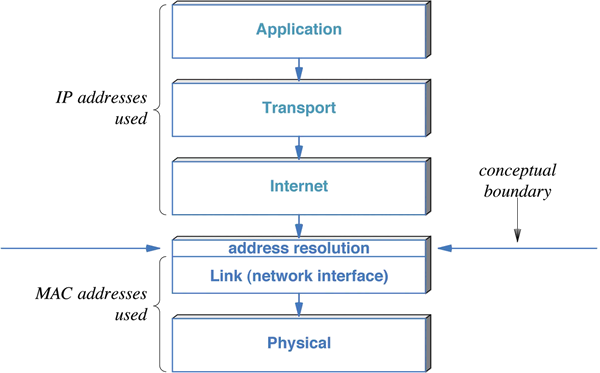
- Above network interface, everything uses IP addresses.
- In network interface and below, we use hardware addresses, so the translation is at the top of network interface.
- IP6 resolution is part of IP6 itself, rather than a support protocol.
- Operation is similar. The host wishing to send first transmits a Neighbor Solicitation message, much like an ARP who has.
- The holder of the address answers with a neighbor solicitation response.
- Difference: The solicitation is not broadcast, it is sent to a multicast address called the solicited-node address.
- The IP6 solicited-node address is computed from the low 24 bits of the IP6 host address, with the prefix ff02::1:ff/104. (This prefix is in the IP6 multicast range.)
- Solicitation messages are sent to the solicited-node address built from the requested IP6 address.
- Each host listens on its solicited-node address built from its own IP6 address.
- The multicast MAC address for any IP6 multicast address is a 1 followed by the low 23 bits of the multicast address, which makes it a hardware multicast address.
- That all means that solicitations generally go only to the correct host. It may go to a few others, which can discard it.
- This is more efficient ARP, where pretty much all the hosts on a large network must discard large numbers of who has broadcasts which don't apply to them.
- Encapsulation, Resolution, and Routing. Here we cover a detail about
IP routing that we avoided earlier.
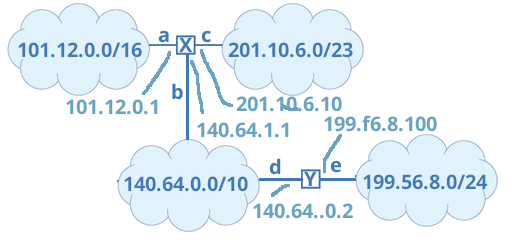
- To the right is another version of the network described earlier. This adds the IP addresses bound to the router interfaces.
- Earlier, we gave the routing table for router X as
Network Mask Line 101.12.0.0 255.255.0.0 a 140.64.0.0 255.192.0.0 b 199.56.8.0 255.255.255.0 b 201.10.6.0 255.255.254.0 c - A better answer is this
Network Mask Destination 101.12.0.0 255.255.0.0 a local 140.64.0.0 255.192.0.0 b local 199.56.8.0 255.255.255.0 b gateway 140.64.0.2 201.10.6.0 255.255.254.0 c local - Local delivery means the router sends directly the recipient, which is on the same network.
- When it sends local, it ARPs the destination address and the hardware network takes it there directly.
- The table specifies that when sending to the 199.56.8.0/24 network, it must send the packet to another router first, the gateway.
- In fact, the router will ARP the address of the gateway, not of the recipient.
- A packet bound for 199.56.8.22 will be sent in a hardware packet bound for the MAC address of 140.64.0.2. That will receive the packet and consult its own routing table.
- The computer you are looking at this page on probably has a routing
table that looks something like this:
Network Mask Destination 10.20.30.40 255.255.0.0 a local default a gateway 10.20.30.1 - Assumes you are on a network 10.20.30.40/16, and have only a single network connection that I called a.
- Assumes your organization or ISP has an external router at 10.20.30.1.
- If it's local, deliver it. If not, it's the gateway's problem.
- Routing tables get more complex and you move further from the edge nodes.