- The Internet needs a system to address individual hosts. IP host addresses are part of the Internet abstraction and determined by software.
- In our discussion, we will start with IP version 4 addresses, and cover version 6 at the end.
- IP4 Addresses.
- IP addresses are simply 32-bit numbers.
- But it is conventional to write them as four decimal
values separated by dots,
the values of each byte.
Binary Number Dotted Decimal Notation 10000001 00110100 00000110 00000000 129.52.6.0 11000000 00000101 00110000 00000011 192.5.48.3 00001010 00000010 00000000 00100101 10.2.0.37 10000000 00001010 00000010 00000011 128.10.2.3 10000000 10010001 11111111 00010100 128.145.255.20
- Addresses are hierarchical, having a network
part and a host part.
- Routers use the network part to address other routers.
- The 32-bit address is divided into network and host part.
- All network addresses differ.
- Hosts within a network differ.
- Different addresses are divided in different places.
- Sizes of the network and host parts vary, but always total 32.
- Where you divide them has evolved.
- Original design: Address classes.
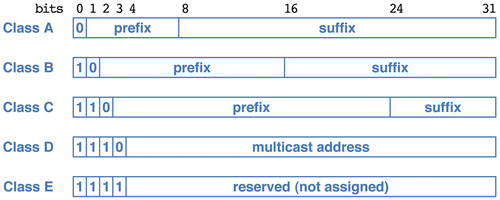
Class Prefix
BitsRange Max Nets Suffix
BitsMax Hosts A 7 0-127 128 24 16777216 B 14 128-191 16384 16 65536 C 21 192-224 2097152 8 256 - Organizations are assigned a class of addresses based on their size.
- Network numbers are given by their prefix with the host number zero.
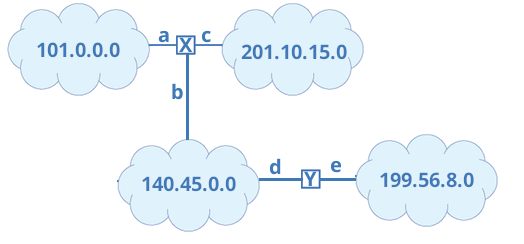
- An on-line organization is given a specific prefix of class A, B or C, and then assigns host numbers as they like. If you are given class B net 140.45.0.0, you may assign your hosts 140.45.0.1 through 140.45.255.254. (All one and all zero host numbers are not used.)
- When a packet bound for 140.45.66.208 reaches router X, it knows from the first two bits that the destination network is 140.45.0.0, where a host numbered 140.45.66.208 must reside.
- It will send the packet through line b.
- Classful addressing wastes a lot of addresses.
- The scheme was designed before the invention of the PC, and before smart phones.
- Computers were large and expensive, and and a company wouldn't have all that many.
- And many companies will have no need of a computer network at all.
- Seemed like plenty of addresses at the time.
- To use addresses more efficiently, we now give networks with
explicit sizes.
- The network number is still given as 32 bits, including the network number prefix and a host number of zero.
- The prefix size is given as a mask, a 32-bit number having 1s in the prefix part and zeros in the host part.
- For instance, a network with a 18-bit prefix might be given as
or in decimal 101.211.64.0 / 255.255.192.0.Network Number Network Mask 01100101 11010011 01000000 00000000 11111111 11111111 11000000 00000000 - The network number is class A, but we ignore that and use the mask, which has ten ones.
- Since the ones are always at the left, this is usually expressed in a shorter form: 101.211.64.0 / 18, where we just give the size of the network number instead of the mask.
- This called Classless Inter-Domain Routing (CIDR).
- This odd arrangement is intended to allow routers to quickly answer
the question, “does this address belong to this network?”
- Combine the address with the mask using the bit-wise and operator.
- The ones in the mask retain their associated bit which is part of the network number.
- The zeros in the mask clear their associated bit which is part of the host number.
- If the result is the network number, it's a match. Otherwise, not.
- Example: Network 101.211.64.0 / 18
- Destination address 101.211.74.38:
The destination belongs to the network.01100101 11010011 01001010 00100110 11111111 11111111 11000000 00000000 01100101 11010011 01000000 00000000 - Destination address 210.45.75.200
Not even close11010010 00101101 01001011 11001000 11111111 11111111 11000000 00000000 11010010 00101101 01000000 00000000 - Destination address 101.211.250.10:
Not a match.01100101 11010011 11111010 00001010 11111111 11111111 11000000 00000000 01100101 11010011 11000000 00000000
- Destination address 101.211.74.38:
- Organizations are assigned a class of addresses based on their size.
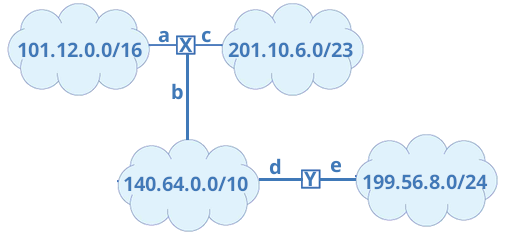
- When a packet bound for 140.70.66.208 reaches router X, it tests it against all the relevant receivers, and finds that 140.70.66.208 does match 140.64.0.0/10.
- It will send the packet through line b.
- Routers
need routing tables to know where to send things.
- Router must know, for any network, where to send the packet. For
router X above, it might look like this:
Network Mask Line 101.12.0.0 255.255.0.0 a 140.64.0.0 255.192.0.0 b 199.56.8.0 255.255.255.0 b 201.10.6.0 255.255.254.0 c - Or more likely,
Network Mask Line 101.12.0.0 255.255.0.0 a 201.10.6.0 255.255.254.0 c default b - A default route shortens the table.
- If an address matches multiple entries in the routing table, the one with the longest prefix is used.
- Where these come from, and some other wrinkles we'll cover later.
- Router must know, for any network, where to send the packet. For
router X above, it might look like this:
- Can be used to subdivide networks
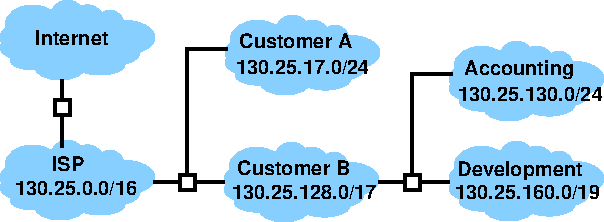
- The ISP perhaps retains its old class B network 130.25.0.0.
- This can be divided by giving smaller CIDR networks to customers.
- Large customers may subdivide again.
- A few special networks and addresses
- During network setup, a computer may use the address 0.0.0.0 to refer to itself.
- During operation, any address in the network 127.0.0.0/8 refers to the local computer. Packets sent to such an address are delivered back to the sender.
- The address 255.255.255.255 is the “limited broadcast,”. It allows messages to be sent to part of the local network, limited by local policy.
- An address with a host number of all ones is a broadcast to the indicated subnet. For instance, 220.191.255.255 is sent to all of the network 220.128.0.0/10.
- All broadcasts may be limited by local policy for efficiency or security reasons.
- Addresses are assigned to network interfaces, so a computer may have
more than one at the same time if it has multiple interfaces.
- Routers, connected to multiple networks.
- High-availability: in case one net goes down.
- Performance: more wires, more packets.
- Many consumer laptops have both wireless and wired interfaces. Usually both are not activated at once, but it's quite possible. Each will have it's own IP address.
- Original design: Address classes.
- IP6 addresses.
- IP6 addresses are 128 bits long, with the following format:

- Routing to a network is done on the 64-bit prefix. Network numbers are 64 bits max.
- The lower 64 bits designates a host on the network.
- The size of the global prefix size is given with the address in CIDR notation, but not reduced to a mask.
- Given in hex, in groups of 4 digits separated by colons: 69DC:8864:FFFF:FFFF:0000:1280:80C0A:FFFF
- Leading zeros can be omitted from groups.
- IP6 addresses usually contain large runs of zeros,
which are abbreviated by a double colon:
FF0C:0000:0000:0000:0000:0000:000A:00B1 can be written FF0C::A:B1 - You can only use the :: once, and it stands for enough zeros to fill up 128 bits. Using it more than once would be ambiguous.
- Parts
- An organization is assigned a global prefix, with a length, as a network number.
- The balance of the subnet field is for routing inside the organization's network.
- The interface indicates a specific computer.
- Originally, computed from the MAC address.
- Now assigned a random number to avoid tracking concerns.
- Number is assigned to the interface at boot time, or even at OS installation.
- Special networks and addresses, not assigned to an organization:
- The loopback address is ::1.
- FE80::/10 is the link local, which refers to a host on the same subnet.
- Usually, FE80::/64 is treated as link local, since it's hard to know what that extra 54 prefix bits should mean.
- Address classes.
- Unicast: Delivered to the single destination having the address.
- Anycast: Delivered to one of some number of hosts having the address.
- There is not difference in format; it's just a matter of how the address is routed.
- The same thing is often done in IP4, but it violates the IP4 standard. IETF wanted to bless it into legality in 6.
- Multicast, sent to all computers having that address.
- Another special network, ff00::/8.
- These exist in IP4 as well, but use beyond the local net is rare in both schemes.
- IP6 addresses are 128 bits long, with the following format:
- Current systems use something called Network Address Translation (NAT), which allows reuse of addresses. We will study this later.